Introduction
Traditionally, adding AI to a web application meant sending every prompt to a cloud API such as OpenAI, Gemini, or Claude. While this approach works well, it introduces latency, privacy concerns, network dependency, and API costs.
In 2025 and 2026, browsers began moving in a different direction. Instead of relying entirely on remote AI services, modern browsers are starting to ship AI models directly inside the browser itself.
This shift is known as Client-Side AI or Browser AI, and it could fundamentally change how we build web applications.
What is Client-Side(Browser) AI?
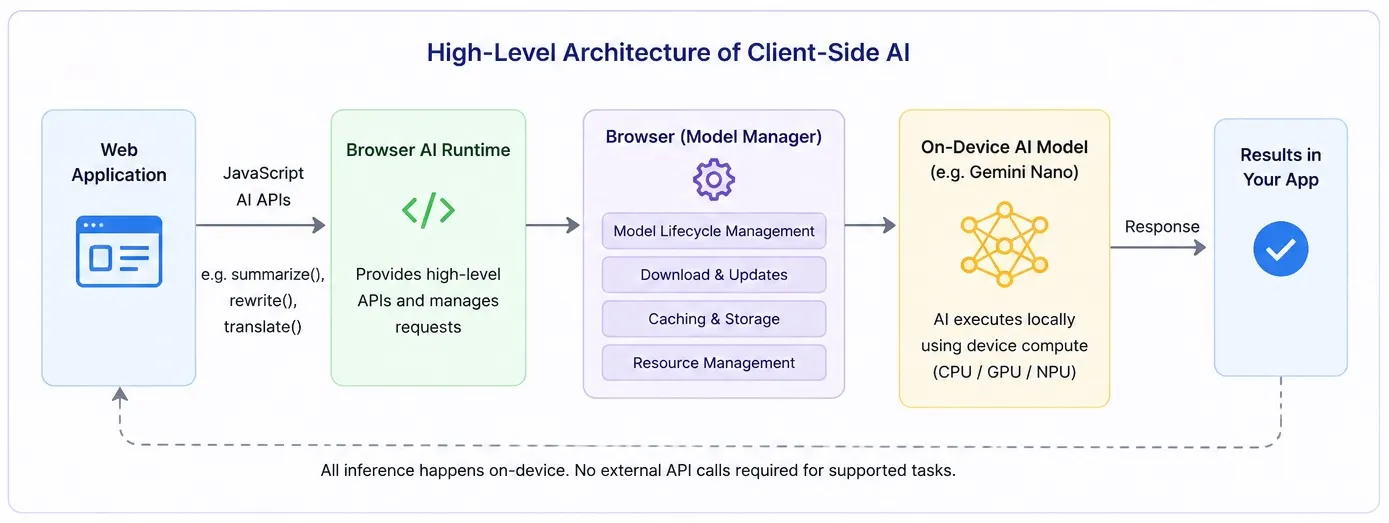
Client-Side AI (also known as Browser AI) refers to the ability to run AI models directly inside the web browser instead of sending user data to a remote server or cloud-based AI service. In this approach, the AI executes locally on the user’s device, leveraging available hardware such as the CPU, GPU, or NPU for inference. This fundamentally changes how web applications integrate AI, making them faster, more privacy-friendly, and capable of working even when internet connectivity is limited.
Unlike traditional cloud-based AI, where every prompt is sent to an external API, Client-Side AI allows the AI model to be downloaded once, typically in the background or during first use, and then cached by the browser for future requests. The browser manages the entire model lifecycle, including downloading, updating, caching, and resource management, allowing developers to focus on building features instead of AI infrastructure. Through built-in JavaScript APIs, web applications can access capabilities such as text generation, summarization, rewriting, translation, and language detection. For these supported tasks, there is no need to call external AI APIs, resulting in lower latency, reduced operational costs, improved user privacy, and a more responsive user experience.
Looking for a hands-on guide? This article explains the concepts behind Client-Side AI and Browser AI. If you want to set up Chrome Built-in AI, enable the required flags, understand hardware requirements, and build your first Browser AI application, read my companion guide: Chrome Browser AI: Setup, Requirements & API Guide
Why Client-Side AI Matters
Client-Side AI represents one of the most significant advancements in modern web development. Traditionally, every AI-powered feature required sending user requests to cloud-based Large Language Models (LLMs), introducing network latency, API costs, and privacy concerns. By running AI models directly inside the browser, developers can build applications that are faster, more responsive, and less dependent on external services. As browser vendors continue investing in on-device AI, Client-Side AI is set to become a core capability of next-generation web applications.
Enhanced Privacy and Security
One of the biggest advantages of Client-Side AI is that user data remains on the user’s device. Since prompts and responses are processed locally, sensitive information does not need to be transmitted to external AI providers. This makes Client-Side AI particularly valuable for industries such as healthcare, finance, government, and enterprise applications where data privacy, regulatory compliance, and security are critical.
Faster Performance and Better User Experience
Because AI inference happens locally, web applications can eliminate the network round-trip required by cloud APIs. This significantly reduces response times, enabling near-instant features such as text rewriting, grammar correction, summarization, translation, and intelligent autocomplete. The result is a smoother, more responsive user experience that feels native to the browser.
Offline AI Capabilities
Unlike traditional cloud-based AI services, Client-Side AI can continue working even with limited or no internet connectivity, provided the required model has already been downloaded. This enables offline productivity tools, note-taking applications, travel apps, documentation platforms, and educational software to offer AI-powered experiences anywhere, without relying on a constant network connection.
Lower Infrastructure and API Costs
Cloud-based AI requires developers to pay for every API request, often resulting in significant infrastructure costs as applications scale. By shifting supported AI workloads to the user’s device, Client-Side AI dramatically reduces server-side inference costs and minimizes backend infrastructure requirements. Developers can reserve cloud AI for complex reasoning tasks while using browser AI for everyday features such as content generation, rewriting, summarization, and translation.
A New Era of Intelligent Web Applications
Client-Side AI is transforming the browser from a simple rendering engine into an intelligent application runtime. Instead of treating AI as a remote service, developers can integrate built-in browser AI directly into their applications through JavaScript APIs. This architectural shift opens the door to a new generation of AI-powered web experiences that are faster, more private, cost-effective, and capable of delivering real-time assistance directly on the user’s device.
Google Chrome’s Built-in AI
Google is leading the adoption of Client-Side AI through Chrome’s Built-in AI initiative, a collection of browser-native APIs that enable web applications to perform AI-powered tasks without integrating third-party AI SDKs or making cloud API calls for supported use cases. According to the official Chrome for Developers documentation, Chrome provides browser-managed AI models and standardized JavaScript APIs, allowing developers to build AI-powered web experiences while the browser handles model distribution, updates, security, and hardware optimization. Learn more in Google’s Built-in AI Overview and Built-in AI APIs Documentation.
At the heart of this initiative is Gemini Nano, Google’s lightweight on-device Large Language Model (LLM), designed to run inference directly on the user’s device using the available CPU, GPU, or NPU. Instead of developers downloading or managing AI models themselves, Chrome automatically downloads the required model when needed, caches it locally, keeps it updated, and optimizes execution for the underlying hardware. Developers simply invoke familiar JavaScript APIs while Chrome manages the complete AI lifecycle. This significantly reduces development complexity while delivering lower latency, enhanced privacy, offline capabilities, and lower infrastructure costs.
Chrome currently offers several Built-in AI APIs covering common AI tasks, including the Prompt API for general-purpose prompting, Summarizer API, Writer API, Rewriter API, Translator API, Language Detector API, and Proofreader API. Some APIs are already available in Chrome Stable, while others are in developer trials or the Early Preview Program as Google continues working toward standardizing these capabilities across modern web browsers. Developers can track the latest API status and browser support on the official Chrome Built-in AI APIs page.
Chrome Built-in AI APIs (Current API Support)
Chrome’s Built-in AI initiative provides a growing collection of browser-native JavaScript APIs that allow developers to integrate AI capabilities directly into web applications without relying on external AI services for supported tasks. Instead of building custom integrations with cloud-based LLMs, developers can leverage these standardized APIs to perform common operations such as text generation, summarization, translation, rewriting, language detection, and proofreading. As the Web AI ecosystem evolves, Google continues to expand these APIs with the goal of making Client-Side AI a core capability of the modern web platform.
The table below summarizes the major AI APIs currently available or under development as part of Chrome’s Built-in AI initiative. Since the availability of these APIs changes frequently across Chrome releases, it is recommended to refer to the official Chrome documentation for the latest support status and implementation details.
| AI API | Purpose | Typical Use Cases | Documentation |
|---|---|---|---|
| Prompt API | A general-purpose AI interface for prompting the built-in language model with natural language instructions. | Chatbots, Q&A, code explanations, content generation, intelligent assistants | Documentation |
| Summarizer API | Generates concise summaries from long-form text while preserving key information. | Article summaries, meeting notes, documentation, email digests | Documentation |
| Writer API | Creates original written content based on user prompts. | Email drafting, blog writing, product descriptions, marketing copy | Documentation |
| Rewriter API | Rewrites existing text while preserving its original meaning. | Improve readability, simplify technical content, adjust writing tone | Documentation |
| Proofreader API | Detects and corrects grammar, spelling, punctuation, and writing style issues. | Grammar correction, writing assistants, document editing | Documentation |
| Translator API | Translates text between supported languages directly on the user’s device. | Multilingual websites, travel applications, messaging apps | Documentation |
| Language Detector API | Automatically identifies the language of input text. | Auto-translation, localization, multilingual search, content classification | Documentation |
Note: Some of these APIs are available in Chrome Stable, while others are part of the Early Preview Program or Origin Trials. Google is actively evolving the Built-in AI platform, so API availability, browser support, and implementation details may change over time. Before adopting any API in production, always consult the official Chrome Built-in AI APIs documentation for the latest status:
Is Browser AI Free to Use?
“If Chrome is running Gemini Nano, who’s paying for it? Is Google charging per token?”
One of the biggest advantages of Client-Side AI is its pricing model. Unlike cloud-based AI services such as OpenAI, Gemini API, or Claude API, Chrome’s Built-in AI APIs do not charge developers on a per-token or per-request basis. Since the AI model runs entirely on the user’s device, inference happens locally inside the browser rather than on Google’s cloud infrastructure.
The browser automatically downloads the required on-device AI model (such as Gemini Nano) the first time it is needed and manages the model lifecycle, including updates and caching. Once the model is available, your application can execute supported AI tasks without sending prompts to a remote server and without incurring API usage charges.
Things to Keep in Mind
Although Browser AI eliminates token-based API costs, it isn’t completely “free” in every sense:
- The user downloads the AI model once, which consumes device storage and bandwidth.
- AI inference uses the user’s CPU, GPU, or NPU, so it consumes local compute resources and battery power.
- Browser AI currently supports lightweight on-device models rather than the largest cloud-hosted LLMs.
- If your application also calls cloud AI services for advanced reasoning, those cloud requests will still incur their normal API costs.
What About Other Browsers?
The race to bring Client-Side AI and Browser AI to the web is no longer limited to Google. Every major browser vendor is investing in artificial intelligence, but each is taking a different approach. While Google focuses on exposing AI capabilities through browser-native JavaScript APIs, other vendors are prioritizing AI assistants, privacy, or operating system integration.
| Browser | Current AI Strategy | Browser AI APIs | Status |
|---|---|---|---|
| Google Chrome | Built-in AI powered by Gemini Nano with standardized JavaScript APIs for web developers. | ✅ Yes | Industry Leader |
| Microsoft Edge | Deep integration of Microsoft Copilot and AI-powered browsing features, built on Chromium. | 🟡 Limited | Rapidly evolving |
| Mozilla Firefox | Privacy-first AI features with optional AI integrations and user control. | 🟡 Experimental | Early adoption |
| Apple Safari | Focused on Apple Intelligence and on-device AI within the Apple ecosystem. Public browser AI APIs are still limited. | ❌ Not yet | Watching the space |
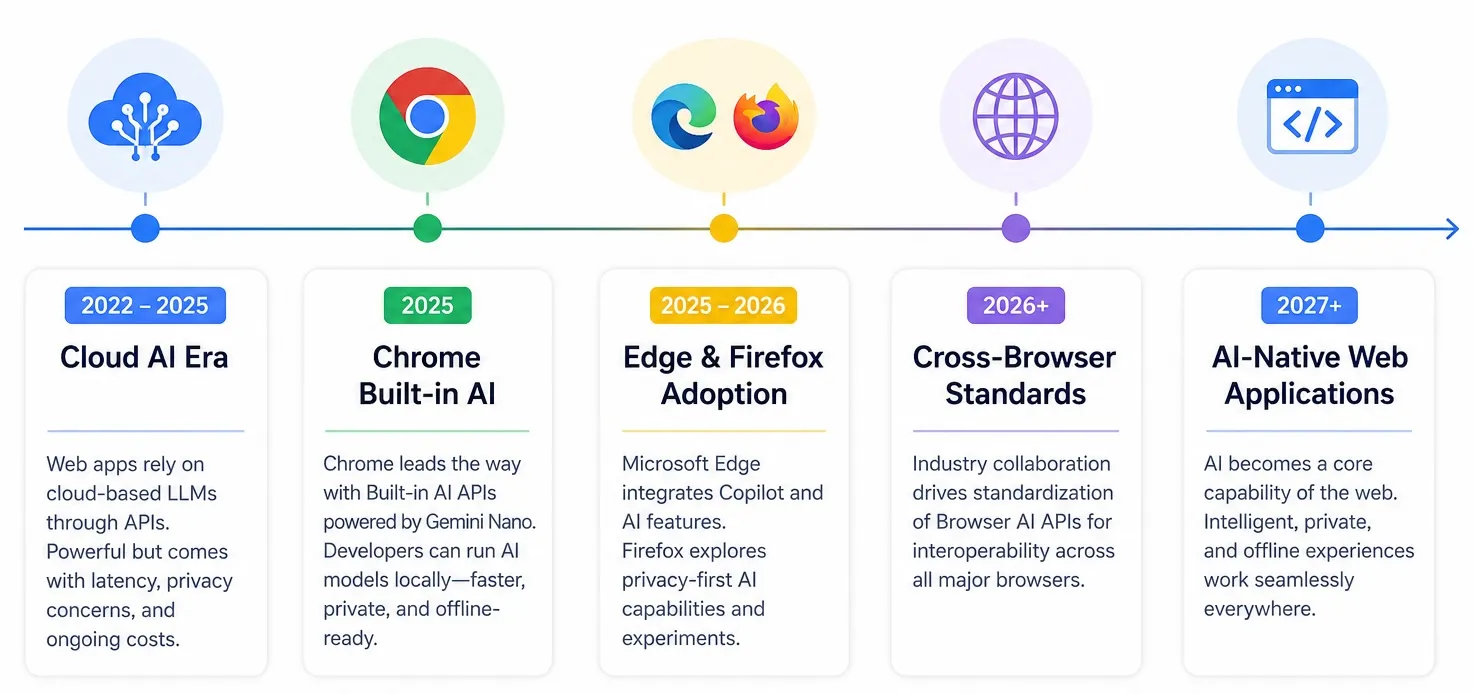
Although every browser vendor is approaching AI differently, the long-term direction is becoming increasingly clear: AI is becoming a core capability of the web platform. Industry efforts are already underway to standardize browser AI capabilities, much like WebAssembly, WebGPU, and WebRTC became cross-browser standards. As these APIs mature, developers can expect a future where intelligent, privacy-preserving, and offline AI experiences work consistently across all major browsers.
Here’s an infographic regarding the evolution of Browser AI and where we stand today.
Real-World Use Cases
As Client-Side AI and Browser AI become more widely available, developers can build intelligent web applications without relying on cloud-based AI APIs for every interaction. Here are some practical use cases where on-device AI delivers fast, private, and low-latency user experiences.
| Use Case | How Client-Side AI Helps |
|---|---|
| Writing & Email Assistants | Draft emails, rewrite text, fix grammar, and adjust tone directly in the browser without sending sensitive content to external AI services. |
| Content Summarization | Instantly summarize articles, reports, meeting notes, or documentation using the browser’s built-in AI, even when working offline. |
| Real-Time Translation | Detect languages and translate text locally, enabling multilingual websites, travel applications, and messaging platforms while protecting user privacy. |
| AI-Powered Developer Tools | Explain selected code, generate documentation, rewrite comments, or simplify technical content directly inside browser-based IDEs and documentation portals. |
| Smart Productivity Applications | Enhance note-taking apps, CRMs, project management tools, and knowledge bases with intelligent search, text generation, and proofreading without incurring cloud AI costs. |
By combining Browser AI with traditional cloud-based AI services, developers can build faster, more private, and cost-effective user experiences while reducing dependence on external APIs.
Code Examples
Before running these examples, make sure Chrome Built-in AI is correctly configured on your machine. Follow my step-by-step Chrome Browser AI: Setup, Requirements & API Guide to install the required Chrome version, enable the necessary flags, and download the on-device AI model.
Now that we’ve covered the concepts behind Client-Side AI, let’s look at a few practical examples using Chrome’s Built-in AI APIs. Before calling any AI API, it’s a good practice to verify that the browser supports the required capability and that the AI model is available.
1. Detecting Browser Support
The following example checks whether the Prompt API is available before attempting to use it.
if ('LanguageModel' in self) {
  console.log('Prompt API is supported');
} else {
  console.log('Prompt API is not supported');
}
You can also check whether the browser is capable of creating a language model session:
const availability = await LanguageModel.availability();

if (availability === "available") {
  console.log("Browser AI is ready!");
} else {
  console.log(`Current status: ${availability}`);
}
2. Calling the Prompt API
Once support has been confirmed, creating a language model session is straightforward.
// Step 1: Chrome checks whether the required AI model exists locally.
//
// Step 2: If not, Chrome automatically downloads the model
// in the background (one-time download).
//
// Step 3: Chrome caches and manages the model lifecycle
// (updates, storage, memory management).
//
// Step 4: A language model session is created for your application.
const session = await LanguageModel.create();

// Use the model just like any other JavaScript API.
const response = await session.prompt(
  "Explain Client-Side AI in one paragraph."
);

console.log(response);
3. Streaming AI Responses
Like cloud-hosted LLMs, Chrome’s Prompt API also supports streaming responses, making it ideal for chat interfaces and AI assistants.
// Reuse the existing Browser AI session.
// If the model was already downloaded earlier,
// Chrome simply uses the cached version.
const session = await LanguageModel.create();

const stream = session.promptStreaming(
  "Write a short introduction to Browser AI."
);

for await (const chunk of stream) {
  console.log(chunk);
}
Note: Chrome’s Built-in AI APIs are still evolving, and availability may vary depending on your Chrome version, operating system, hardware, and participation in the Early Preview Program or Origin Trials. Always consult the latest documentation before implementing these APIs in production.
Official Documentation
- Prompt API: https://developer.chrome.com/docs/ai/prompt-api
- Built-in AI APIs: https://developer.chrome.com/docs/ai/built-in-apis
- Official Google Web AI Demoes: https://chrome.dev/web-ai-demos/
Where Browser AI Is Headed
Although Client-Side AI is still in its early stages, the direction of the industry is becoming increasingly clear. Here are the key trends developers should watch over the next few years:
- AI becomes a native browser capability – Just like WebAssembly and WebGPU, AI will become a built-in feature of every major web browser.
- Cross-browser AI standards will emerge – Browser vendors are expected to standardize Browser AI APIs, making AI features portable across Chrome, Edge, Firefox, Safari, and other browsers.
- AI-powered web applications become the norm – Features such as writing assistants, summarization, translation, proofreading, and intelligent search will become standard in modern web applications rather than premium add-ons.
- Hybrid AI architectures will dominate – Applications will combine Client-Side AI for fast, private, and offline tasks with cloud-based LLMs for advanced reasoning, RAG, AI agents, and large-context processing.
- Multimodal Browser AI is coming – As CPUs, GPUs, and NPUs continue to improve, browsers will increasingly support on-device processing of images, audio, and video alongside text.
- Privacy-first AI adoption will accelerate – Running AI directly on the user’s device will help organizations improve privacy, reduce latency, and lower infrastructure costs.
My Take: Browser AI won’t replace cloud AI, but it will fundamentally change how we build AI-powered web applications. The future belongs to hybrid AI architectures, where local and cloud AI work together to deliver faster, more intelligent, and more private user experiences.
Conclusion
Client-Side AI represents one of the biggest architectural shifts since Progressive Web Apps and WebAssembly. By bringing AI models directly into the browser, developers can build faster, more private, and more responsive applications while reducing infrastructure costs.
Although today’s browser AI APIs are still evolving, the direction is clear: the browser is no longer just a rendering engine, it is becoming an AI runtime.
As browser vendors continue investing in on-device intelligence, understanding Client-Side AI today will prepare developers for the next generation of AI-powered web applications.
Continue Reading
If you enjoyed this article, you may also like: