Tools are the capabilities AI agents use to perform actions outside their own reasoning, such as retrieving data, calling APIs, or executing workflows.
They help AI agents move from simply thinking to actually doing and providing extra context.
If you’re building tools using the Model Context Protocol (MCP), understanding how to define tool boundaries is one of the most important design decisions.
One common question while building MCP/Agent tools:
Should one tool contain multiple API calls, or should every API endpoint become its own tool?
The answer and a key principle:
Design tools around user intent, not backend endpoints.
Think in user goals, not API endpoints. Users and AI agents think in tasks or actions. This approach aligns closely with the design philosophy encouraged by the official MCP specification.
A useful rule:
One tool = One meaningful capability
Whether you’re building tools for MCP servers, AI agents, or ChatGPT Apps, capability-oriented tool design generally produces more reliable agent behavior.
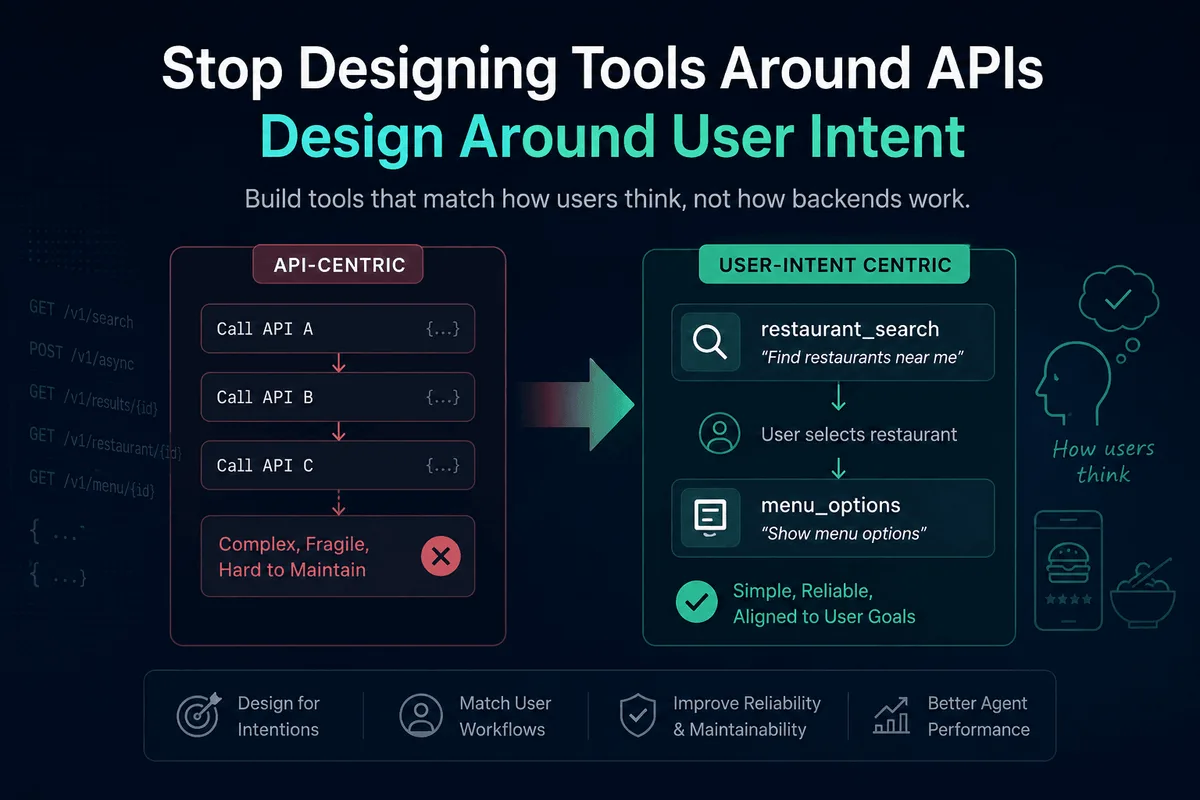
Let’s take a food delivery example. When ordering food, users and agents typically go through two logical actions:
- Search restaurants and menu options
- Select a restaurant and see available dishes/customizations
Users think:
“Find restaurants near me”
“Show menu options”
Users do not think:
Call API A → API B → API C
Good tool design
restaurant_search

↓ User selects restaurant

menu_options
Why split them?
- The second step depends on a user/agent decision
- The next step needs different inputs (selected restaurant ID, session details, etc.)
- Each step can be retried independently
Use a single tool when:
- The user should not manage session IDs, polling, or intermediate state
- Steps always run together
- Partial results are not useful
- You want one error flow and timeout boundary
For example, restaurant_search can internally:
Start search
↓
Poll results
↓
Fetch restaurant details
But externally the agent only sees:
“Find restaurants near me”
Practical guidelines for MCP/AI agent tool design
Most modern MCP implementations are built using the official SDKs, which make it easier to expose tools, resources, and prompts consistently.
- Name tools by outcomes, not endpoints (restaurant_search instead of post_async_search). The first explains the goal; the second exposes backend details.
- Return everything needed for the next step. Make handoffs predictable.
- Keep output structures stable. Agents often reuse returned fields.
- Respect timeout boundaries. Large multi-step tools need enough time for polling, retries, and resource loading.
Good tools hide implementation complexity while exposing meaningful actions.
Design for intentions, not endpoints!!
Common MCP Tool Design Mistakes
While designing MCP tools, teams often make the mistake of mapping every backend endpoint directly to a tool. Common pitfalls include:
- Creating one tool per API endpoint
- Exposing session IDs and polling mechanisms
- Returning unstable output schemas
- Using implementation-focused names such as post_async_search
- Requiring agents to orchestrate backend workflows
These designs leak implementation details to the agent and increase the likelihood of tool misuse.
A better approach is to expose meaningful capabilities that align with user goals while hiding backend complexity.
Frequently Asked Questions
What is MCP (Model Context Protocol)?
Model Context Protocol (MCP) is an open standard that enables AI agents to interact with external tools, services, and data sources through a consistent interface. It helps agents discover and use capabilities beyond their built-in knowledge.
What is the difference between an API and an MCP tool?
An API is a backend interface designed for applications and developers. An MCP tool is a capability exposed to an AI agent. A single MCP tool may internally use multiple APIs while presenting a simple interface to the agent.
Can a single MCP tool call multiple APIs?
Yes. An MCP tool can orchestrate multiple API calls, data transformations, and backend workflows. The key is that these operations collectively represent a single user-facing capability.
How do AI agents choose which MCP tool to use?
AI agents choose tools based on the user’s intent, the tool descriptions, and the available inputs. Clear tool names and descriptions make it easier for agents to select the correct tool and complete tasks reliably.
Further Reading
If you enjoyed this article, you may also like:
- Client-Side AI: Running AI Models Directly in the Browser (The Future of Web Apps)
- AI Is Changing Software Engineering: Why the Era of the Pure Coder Is Fading
- How to Build a Slack AI Assistant with Node.js - Step by Step (Part 1)
- Engineering Leadership: Why the Best Leaders Work Alongside Their Teams